Spinning in Style: Coloring a 360° RED Camera Rig for Balenciaga

I had a very cool project this spring that I wanted to share. Let’s talk about high fashion, high resolution, and the high-difficulty world of 360-degree video.

Recently, I had the pleasure of jumping into the trenches for Balenciaga’s Fashion Week presentation. The setup was as ambitious as the clothes: a massive 360-degree rig, fully loaded with RED cameras, all feeding into a Disguise system to power a mind-bending visual experience.

My official job title for this gig? Just the colorist.

But anyone who has ever touched a multi-camera array knows that "just the colorist" is a trap. If you grade each camera feed in a vacuum, you are going to hand back a beautiful, completely disjointed mess. To ensure the color handed off seamlessly from one camera's field of view to the next, I had to step slightly out of my lane and build a temp stitch.

Here is a deep dive into how I tackled it, along with a few tips for anyone staring down the barrel of a multi-cam 360 project.

The Problem with 360 Color

When you have a ring of RED sensors pointing in every direction, they are never going to see the world the exact same way. One camera is staring straight into a harsh sun; the next is catching the shadowy falloff. Even with perfectly matched settings, lenses have different characteristics, and sensors have micro variances.

When those images are graded, stitched together and pumped through a Disguise media server onto massive screens, any discrepancy in contrast or color balance at the seams creates a harsh, visible line. It shatters the illusion.

Enter the Temp Stitch

To fix the seams, you have to see the seams. I couldn't wait for the final VFX stitch to come back before doing my grades, so I built a quick-and-dirty temp stitch right in the color bay using Baselight’s 3x3 view mode.

Here are my top tips for managing the madness and making sure your handoffs are buttery smooth:

1. Color Management is Non-Negotiable

Before you even look at a seam, your color management pipeline needs to be bulletproof. Working in a scene-referred space (like ACES) is an absolute lifesaver here. By transforming all those RED raw files into a massive, unified working space, you ensure the math behind your exposure and contrast adjustments behaves predictably across the entire array. The next step is to build camera specific LUT’s that correct any sensor and lens discrepancies.

2. Flatten the Field (Beware the Vignette)

This is the silent killer of 360 stitching: lens vignetting. The center of a lens is always brighter than the edges. When you place two edges side-by-side in a stitch, you get a dark band down the middle of your overlap.

  • The Fix: Before you do any creative grading, you have to build a spatial correction to flatten the luminance across the sensor. Lift those edges so the base exposure is uniform corner-to-corner.

3. Grouping is Great, but Trims are Better

It’s tempting to group all the cameras together, slap a primary grade on, and call it a day. Do apply your base look at the group level, but the real work happens on the individual clip trims. The stack consisted of a grouped operator followed by and individual trim layer. I also added a key framed dynamic layer to control shadow detail as the sun set. You have to ride the offset and pivot on the adjacent cameras to feather the differences in lighting environments.

4. Build a Split-Screen Matrix

My temp stitch wasn't about perfect geometry; it was about perfect color geometry. I set up a workspace where I could view the overlapping edge of Camera A directly against the overlapping edge of Camera B in a split-screen. I just worked my way around the circle: A to B, B to C, C to D... all the way back to A. If A matches B, and B matches C, but the final camera doesn't match A, you have to go back and figure out where your exposure, contrast or color drifted.

5. Output for Disguise: The Final Bake to Notch LC

The Disguise system is incredibly powerful for mapping content to complex surfaces, but it demands technical precision. By doing the temp stitch and mocking up the final layout, I could render out test patches that matched the exact specs the Disguise operators needed.

Once the temp stitch did its job and the final grades were locked, it was time for the heavy lifting. The sheer volume of pixels in a 360 array is staggering, and for this project, we were delivering eight final outputs, each demanding pristine 4K resolution.

To get there, the pipeline was a two-step process. First, the grade was rendered out of the color bay as 10-bit DPX sequences. I love DPX for this stage because it is bulletproof—giving you uncompressed, perfect frames. Plus, if a render machine hiccups on frame 40,000, you don't lose a massive video file, you just re-render that single frame and move on.

However, if you try to make a media server play back eight simultaneous streams of 4K uncompressed DPX frames, it will simply say “computer says no.” To solve this, we took those massive image sequences straight into Adobe Media Encoder to crunch them down into the Notch LC codec. Today it’s built into Baselight, Mistika, etc, but at the time Adobe is what we needed to use. Notch is a 10-bit, GPU-accelerated video codec built specifically for media servers. It retains the immense visual fidelity and color depth of our DPX masters but plays back like absolute butter.

The Wrap-Up

Working with 360 rigs is a unique puzzle. It forces you to think spatially about your color pipeline. Building that temp stitch added a little extra time upfront, but it saved us from a mountain of headaches (and notes) on the backend. The REDs delivered gorgeous data, the fashion was couture and wonderful, and the seams? Completely invisible.

Thanks for reading and happy grading!

JD


Thanks for joining the "Ask the Colorist" panel at SMPTE 2025!

What a lively and insightful afternoon we had at the SMPTE Media Technology Summit! A huge thank you to everyone who joined us at the Solutions Hub Stage to participate in the "Colorist Society Presents: Ask the Colorist" panel. It was a true pleasure to engage in such a thoughtful and forward-looking discussion with my fellow colorists and our enthusiastic audience. We had a lot of great questions asked.

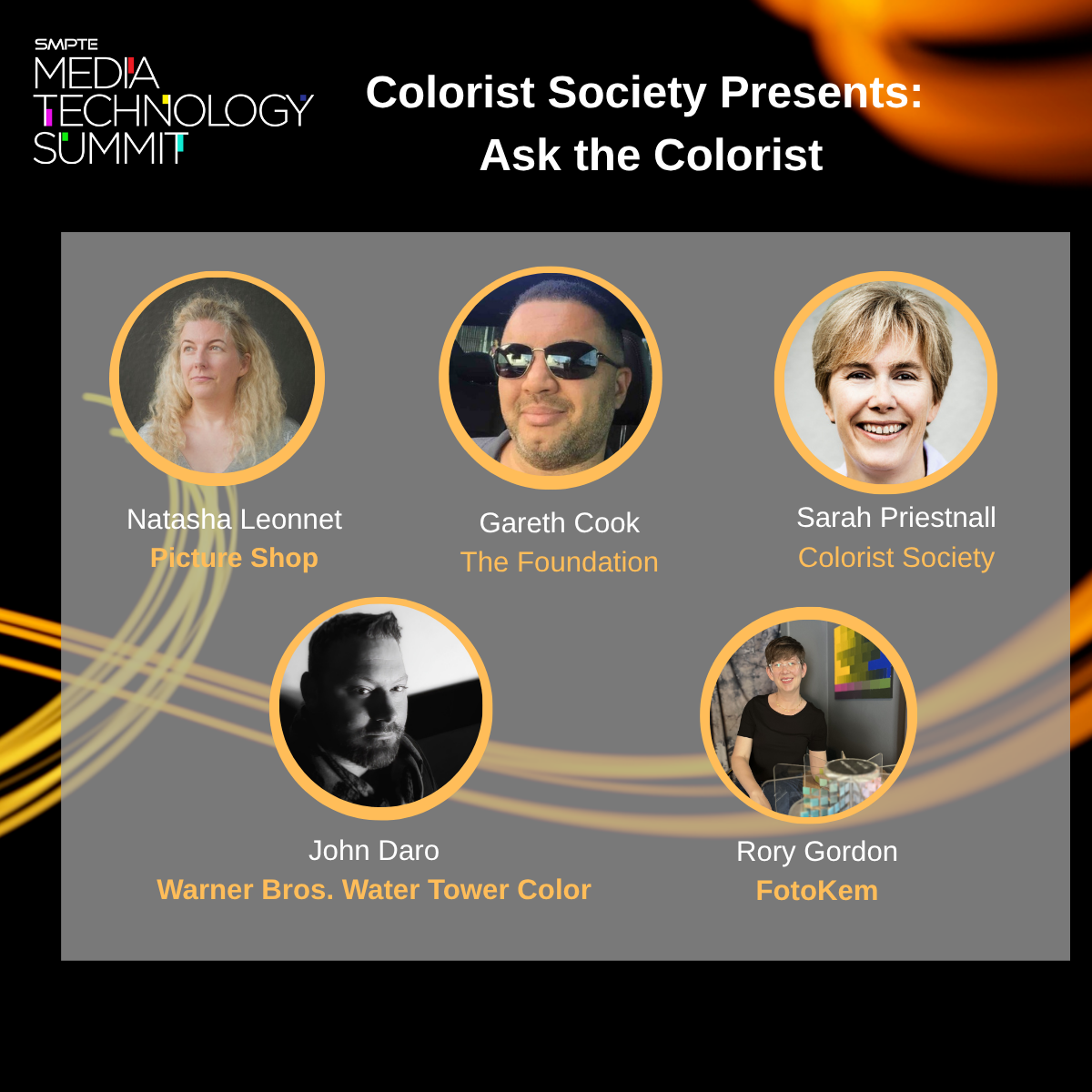
A special shout-out to my esteemed co-panelists: Picture Shop's Natasha Leonnet, The Foundation's Gareth Cook, the Colorist Society's own Sarah Priestnall, and FotoKem's Rory Gordon. Your contributions were invaluable!

For those who couldn't make it, here are some of the deeper takeaways from our conversation.

Delving into machine vision's role
We went beyond a surface-level look at automation and explored the specific, powerful applications of machine vision in the color suite.

  • The conversation around shot matching was particularly rich. We touched on tools from Filmlight’s presentation, which leverage machine vision and perceptual models to quickly analyze a key shot and automatically match its "look" across an entire scene. This technology streamlines the technical heavy lifting, freeing the colorist to focus on artistic direction.

  • It's not just about matching. I've previously blogged about using machine vision to create a depth channel from existing footage. This allows for advanced atmospheric effects, like subtly desaturating the background to draw the viewer's eye to the foreground action.

  • We also addressed the technical hurdles. As machine vision relies on robust image data, we highlighted challenges related to lighting changes, calibration, and managing large datasets. This reinforced the need for a precise and consistent technical foundation. Perhaps even a standard for checkpoints from SMPTE in the future.

The backbone of consistency: The ACES workflow
Another key discussion centered on the Academy Color Encoding System (ACES), which was front and center in conversations about modern post-production.

  • We discussed how this device-independent color management system is no longer a niche tool but a foundational element, especially when dealing with multiple VFX houses and camera formats. ACES simplifies matching footage from different cameras by normalizing everything into a single common space.

  • In the age of HDR, we focused on how ACES provides a predictable and consistent image display across a wide range of devices. This is essential for preserving the creative intent throughout the entire pipeline, from on-set monitoring in virtual production to final delivery.

Balancing art and technology
Ultimately, the technology is only as good as the creative eye behind it. Taste was echo’ed many times by all panelists. Machine vision is a powerful assistant, but it doesn't replace the colorist. The consensus was that our role is shifting:

  • Instead of being overwhelmed by repetitive tasks, soon use machine vision to handle the initial technical correction.

  • This allows us to dedicate more creative energy to refining the mood, shaping the story, and making those nuanced, human-driven decisions that define a project's final look. More time grading and less time “correcting.”

  • The ongoing evolution of remote workflows. The discussion touched upon the lasting changes from the pandemic and how cloud-based grading is becoming more and more common. We talked about how to strike the right balance, manage latency issues, and ensure secure, high-quality collaboration when a client is not in the same room.

  • The importance of consistency over flashiness. A great reminder that long-term success in this field isn't about chasing one viral, incredible grade. It's about consistency, repeatability, and being a reliable, trusted partner within the post-production pipeline. We touched on the importance of checking your ego at the door and focusing on the client's needs.

Thank you again to SMPTE for organizing such an excellent event and to everyone who attended. It was a privilege to share insights and discuss the incredible future of our craft. I look forward to seeing you all again soon!
Join Me for the 'Ask the Colorist' Panel at the 2025 SMPTE Summit!

I'm thrilled to announce that I will be speaking on a panel at the upcoming SMPTE 2025 Media Technology Summit this month in Pasadena.

It's an honor to be part of the "Ask the Colorist" panel, presented by the Colorist Society. This will be one of the highlights of the summit, offering a chance to connect with peers and discuss the craft we're all so passionate about. I'm looking forward to a lively discussion and answering any and all of your questions.

I'll be joined on stage by an incredible group of esteemed professionals, including Natasha Leonnet (Picture Shop), Gareth Cook (The Foundation), Sarah Priestnall (Colorist Society), and Rory Gordon (FotoKem).


Event Details

What: "Ask the Colorist" Panel

Where: The Solutions Hub Stage at the SMPTE 2025 Media Technology Summit, Pasadena Convention Center (300 E Green St, Pasadena, CA)

When: Tuesday, October 14th, 2025, at 2:00 PM

GUEST Registration Link:

https://bit.ly/4h3Yol1 

FREE Solutions Hub Pass  Promo Code

SH25CSI

The full summit runs from October 13-16 and is a must-attend event for anyone in media technology.

If you're attending SMPTE, please mark your calendar and come by the Solutions Hub Stage. I hope to see you there!